

Geometry Arrow
























What Is a Geometry Arrow?
Geometry Arrow is an engaging browser-based arcade title inspired by the famous Wave mode found in Geometry Dash. It is an independent web adaptation rather than an official installment, focusing exclusively on wave mechanics. Built on HTML5, it requires no downloads and runs flawlessly on both desktop and mobile browsers.
In Geometry Arrow, you control a triangular arrow that navigates in a zigzag trajectory. The objective is straightforward: dodge obstacles and reach the finish line. As you advance, the difficulty ramps up significantly. This title appeals to GD veterans looking to sharpen their wave skills and casual players seeking quick reflex tests, sharing the rhythm-based charm of classics like The Impossible Game.
How Do You Play Geometry Arrow?
The core of Geometry Arrow relies on a simple one-button control scheme. Your arrow auto-scrolls forward, and you manage its vertical trajectory.
Here is how the mechanic works:
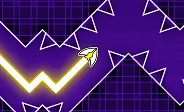
When you click, tap, or hold, the arrow ascends diagonally. Releasing the input causes it to descend diagonally due to in-game gravity. This creates a continuous zigzag motion demanding precise control. The real challenge lies in squeezing through tight corridors and dodging spikes.
If your arrow touches any obstacle—whether it's a wall, spike, ceiling, or floor—the level instantly restarts. A progress bar tracks your advancement from 0% to 100%. Reaching the green portal at the end signifies victory.
Controls are simple and responsive:
- On PC: Use the Left Mouse Button or Spacebar
- On Mobile: Tap and hold the screen
While the controls are accessible, mastering the balance between short taps and long holds requires significant practice.
What Are the Levels in Geometry Arrow?
Geometry Arrow consists of 6 distinct stages. Each stage features a predetermined map layout, specific obstacle arrangements, and immersive background audio. The difficulty curve is well-defined, with each phase increasing in speed, hazard density, and precision demands. Stage 1 serves as a tutorial with fundamental zigzag patterns, often indicated by a relaxed blue emoji. As you progress, the difficulty indicators intensify. You will encounter tighter gaps, spike fields, and narrow caves requiring sharper control.
Because the maps are fixed, success relies on muscle memory rather than luck. Speed spikes near the end of stages test your reflexes. Completing all 6 stages means you have mastered this wave-based gauntlet.
Once you conquer all 6 stages, you can move on to Geometry Arrow 2. The sequel introduces 13 stages and brings Wheel Mode alongside the classic Arrow Mode, with portals that swap mechanics mid-level for added complexity.
Level Difficulty Overview:| Level | Difficulty | Key Challenge |
|---|---|---|
| 1 | Beginner | Zigzag movement basics |
| 2 | Easy | Narrow corridors |
| 3 | Medium | Speed + tighter gaps |
| 4 | Hard | Complex patterns |
| 5 | Very Hard | Dense spikes, fast speed |
| 6 | Expert | Maximum precision |
What Makes Geometry Arrow Different From Geometry Dash?
Geometry Arrow stands apart from Geometry Dash by narrowing its focus solely on wave mechanics. The main GD franchise incorporates various modes (cube, ship, ball, UFO, robot, spider, and wave). This makes GD Arrow a dedicated training simulator for wave mode. By isolating this mechanic, players can enhance their timing and precision without worrying about mode switches. Visually, GD Arrow opts for darker, cave-like environments, contrasting with the vibrant neon aesthetics of Geometry Dash.
Another distinction is the gameplay style. GD Arrow does not enforce beat synchronization, whereas Geometry Dash heavily relies on musical timing. Additionally, GD Arrow is completely free to play in-browser without an account, unlike the premium mobile app versions of GD.
Tips to Master Geometry Arrow
Excelling in Geometry Arrow demands precision, timing, and pattern memorization. Here are some strategies to build consistency:
Learn the Pattern, Not Just the Obstacles - Since every stage uses a fixed layout, focus on memorizing obstacle sequences instead of reacting on the fly.
Use Short Taps for Micro-Adjustments - Master the click-hold technique. Utilize quick taps for micro-adjustments in tight gaps and hold for sustained vertical movement.
Watch the Progress Bar - Use the progress bar to gauge your position. Stay extra vigilant after the 80% mark, as speed spikes often cause sudden deaths near the green portal.
Focus on One Gap at a Time - Break down stages mentally into smaller chunks. This reduces cognitive load and minimizes errors in complex obstacle paths.
Take Short Breaks Between Attempts - Stepping away after a streak of failures prevents burnout. Short breaks reset your reflexes and improve your overall performance in this precision platformer.
Why Do Players Love the Geometry Arrow Game?
Gamers are drawn to Geometry Arrow because it blends minimal one-button controls with intense wave gameplay, forging an addictive fail-and-retry cycle. Its brief stages, immediate respawns, and skill-driven progression make it simple to start but tough to perfect.
Simple Controls, High Precision Gameplay - The one-button system is easy to grasp, but the zigzag wave movement demands exact timing, appealing to both novices and pros.
Addictive Fail-Retry Loop - Instant restarts after every mistake encourage continuous attempts, driving high replayability and keeping players engaged longer than typical browser games.
Short Levels, Fast Gameplay - The concise level design allows for quick runs, fitting perfectly into short casual sessions while delivering a solid obstacle course challenge.
Wave Mode Training for Geometry Dash Players - It serves as an excellent practice ground for GD players to hone their wave control, timing, and pattern recognition for harder levels.
FAQs
Is Geometry Arrow The Same As Geometry Dash?
No, Geometry Arrow is not the same as Geometry Dash. GD is the original rhythm-based platformer created by RobTop. Geometry Dash Arrow is a fan-made or clone-style game that mimics the wave mechanics but lacks the official features, licensed music, and updates found in the original GD.
What Is The Hardest Level In Geometry Arrow?
The hardest level is typically the final stage (Level 6 or "Expert" tier), which features maximum speed, tight timing windows, and complex obstacle patterns. The difficulty peaks here due to frame-perfect inputs and a minimal margin for error compared to earlier stages.
What Other Geometry Dash Games Can I Play on Geometry Dash?
You can enjoy Geometry Dash Lite, Geometry Dash SubZero, Geometry Dash World, and Geometry Dash Wave on Geometry Dash. These spin-offs provide unique levels, modes, and challenges while retaining the signature fast-paced gameplay.